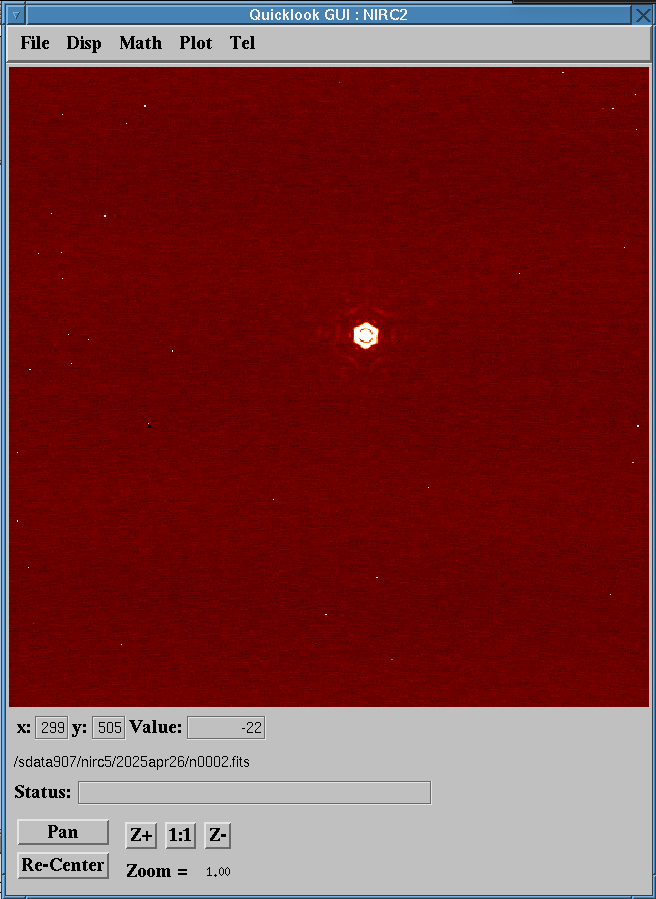
The NIRC2 quicklook GUI is an IDL-based tool to automatically
display NIRC2 images in real time as they are being generated by the
instrument.
IMPORTANT NOTE on data format. The NIRC2 detector software
generates two FITS files per exposure in CDS and MCDS
modes:
Unprocessed file (n_unp_XXXX.fits):
Multi-extension data cube that where every single sample/read is
saved. For instance, let us assume that we are taking a full
array image in MCDS mode with 8 read pairs and 5 coadds, in
which each coadd has an integration time of 1 second. This
translates into the following detector configuration on
a waikoko-new terminal:
subc 1024
sampmode 3 8
itime 1
coadd 5
The corresponding unprocessed image will have the
following format:
n_unp_XXXX.fits[0][1:5][1:1024,1:1024,1:16]
where:
HDU[0] Includes a global header without pixels.
HDU[1:5] Are pixel extensions, one per coadd.
[1:1024,1:1024,1:16] Data cube including 16 read
pairs, each with a full frame size, i.e. 1024x1024 pixels.
Processed file (nXXXX.fits): Single extension
FITS file formed by the average of the differences between the
signal in the final group of reads and initial group of reads
accumulated over the number of coadds. In the case of the example
above, the processed image will have the following
format:
nXXXX.fits[0][1:1024,1:1024]
where:
HDU[0] Includes a global header and pixels.
[1:1024,1:1024] single image with 1024x1024 pixels
where the value for each pixel is the result of the
arithmetics described above.
Exposures taken in Single, UTR, and video
modes1 do not generate
processed FITS files. Only the processed FITS
files taken in CDS and MCDS modes will be displayed in the
quicklook.
The following figure shows the layout of the NIRC2 quicklook GUI:
NIRC2 quicklook GUI
The main window in the quicklook GUI shows the following sections:
NIRC2 images can be opened offline by typing ds9 on
a waikoko-new terminal, but only the NIRC2 quicklook GUI
can automatically display images in real time.
Open..: Navigate through directories and select FITS file
to open. NOTE: Multi-extension unprocessed files
named n_unp_XXXX.fits will not be
displayed. Only single extension processed files
(nXXXX.fits) will be displayed.
Load Instrument Config File: Normally this option should
be untouched. Configuration for NIRC2 images
is nirc2_cfg.
Fits Header: Open a separate window where you can inspect
the image FITS header.
Exit: Exit the quicklook GUI and the underlying IDL
process.
Toggle Keep Zoom/Center: If selected, the zoom and pan
used for the current image will be conserved for subsequent
images.
Center: Click on the image pixel you would like to go to
the center of the display area.
ReCenter: Move the image center to the center of the
display area.
Color Table: Open a new GUI where you can select a
multitude of color palettes and color stretching options.
Reset Display Parameters: Reset display stretching
parameters to the default values. This is a valuable resource
when either manual or pre-defined scaling combined with dynamic
stretching by right-clicking and dragging on the display area
makes it hard or impossible to visualize the image. At that
point, it is probably time to reset the display parameters.
Set Display Parameters... Open window to manually set the
streching boundaries and pre-defined scaling options:
Display Min: Minimum pixel value to be mapped to the
current color palette.
Display Max: Maximum pixel value to be mapped to the
current color palette.
Log Scaling: Display image in logarithmic scale.
Linear Scaling: Display image in linear scale.
Set AutoScale. Sub-menu for predefined scaling
options: None, Hisotgram
Equalization, Mean, Median, Min/Max,
and Asinh. Options None and Min/Max are
identical.
SDiff: Display the difference between the latest image
and the previous one.
Arithmetic: Perform basic arithmetics between two
images. When this option is selected a popup window appears
with the following fields:
Operand 1: You can type the image name in the text
box, click on Pickfile to select the image from a
pulldown menu, or click on Current to select the
latest image on disk.
Operation: Check the box corresponding to the desired
arithmetical
operation: +, -, *, /. The
default operation is subtraction.
Operand 2: You can type the image name in the text
box, click on Pickfile to select the image from a
pulldown menu, or click on Current to select the
latest image on disk.
OK: Execute the selected operation between the two
operands and display resulting image.
Cancel: Exit arithmetic popup window.
Options: Arithmetic options to replace Inf
and NaN values with floats.
Photometry: Perform aperture photometry on the currently
displayed image. When this option is selected, a popup window
appears to select various photometric parameters and display the
results. Left-click on any of the sources in the image to show
the results of the photometric calculation. Available
photometric calculation parameters:
Zero Point: Zero point magnitude for the filter used
in the currently displayed image. Shows default value for
filter, but a different value can be typed in the text box.
Itime: Exposure time per coadd shown in the FITS
header of the currently displayed image. A new value can be
typed in the text box if desired, e.g. to specify the total
exposure time for all coadds.
Inner Sky An: Radius in pixels of the sky region
inner circle.
Outer Sky An: Radius in pixels of the sky region
outer circle.
Aperture (pix): Radius in pixels of the aperture over
which photometric calculations will be performed.
Calculate: Perform photometric calculations with the
selected parameters.
Ok: Close photometry popup window.
Cancel: Close photometry popup window.
Strehl: Calculate Strehl Ratio and FWHM of the PSF on the
currently displayed image. When this option is selected, a popup
window appears to select Strehl calculation parameters and
display the results. Left-click on any of the sources in the
image to show the results of the Strehl calculation. The
following Strehl calculation parameters are available:
Width of Box: Width in pixels of the box enclosing
the source to calculate the Strehl.
Height of Box: Height in pixels of the box enclosing
the source to calculate the Strehl.
Lambda: Central wavelength in micron of the filter
used in the currently displayed image
DLambda: Width in micron of the filter used in the
currently displayed image.
Platescale: Plate scale in arcsecond per pixel of the
camera used in the currently displayed image.
Calculate Strehl Ratio: Press this button to
calculate the Strehl Ratio (SR). A popup display window
zoomed into the selection box will appear. The actual PSF is
shown on the left half of the display, while a model of the
PSF is shown on the right half of the display. The
calculated SR (percentage) and FWHM (arcseconds) are shown
at the bottom of the display area. The SR is calculated as
the ratio of maxima between the observed PSF and model
PSF. The FWHM is estimated as the width of the PSF where the
pixel values are 50% of the maximum. Two estimates of each
quantity are shown: fwhm and strehl
without background subtration, and (fwhmAB
and strehlAB with automatic background
subtraction. There is an EXIT button to exit the
popup display.
Ok: Close Strehl fit window.
Cancel: Close Strehl fit window.
Reduce: Performs basic infrared data reduction of NIRC2
images including sky subtraction, flat-field correction, and
bad-pixel correction if a bad pixel map is provided. A window
with the following fields pops up when this option is selected:
Object: Image of the science target that is to be
reduced.
Sky: Sky image with the same dimensions and taken
with the same filter as the object image.
Flat: Flat-field image wuth the same dimensions and
taken with the same filter as the object image. It is
important to use a normalized flat field to obtain
the best reduction results.
Dead Pixel Map: Specify bad pixel map if the option
to use one is selected. A bad pixel map consists of a 2D
mask with the same size as the object, flat, and sky images
where good pixels have a value of 0 and bad pixels a value
of 1.
Use Dead Pixel Map? Select Yes to use a
bad pixel map during the data reduction process.
Remove Correlated Noise Pattern?
Select Yes if you want to filter correlated noise
pattern present in the images. Results are uncertain since
this option has not been fully tested.
Automatically Save Reduced File to Disk?
Select Yes if you want reduced images to be saved
on disk.
Directory: Data directory where reduced image will be
saved if the option to automatically save reduced image is
selected.
Reduced File Root Prefix: Prefix used in the reduced
image when saved to disk to avoid overwriting original
object image.
Reduce Serial: If selected, it will reduce object
images with frame numbers following the image specified in
the Object box. User will be prompted to confirm if
it is ok to reduce the next image in the series.
Reduce: Press this button to start reduction process
and generate reduced image.
Quit: Press this button to close the reduce image
popup window.
Statistics: Obtain image statistis in a rectangular
region. Left-click and drag, and then release to define the
rectangular region on the displayed image. The size of the
rectangular area can ben fine tuned by typing the pixel
coordinates of the lower-left and upper-right corners in the
(x1, (y1) and
(x2, y2) text boxes, respectively.
Bias/Flat: Select a bias frame to subtract from all
images to be displayed in the quicklook. Select a flat-field
frame to divide all displayed images by.
This is the area of the quicklook where the image is
displayed. Images can be inspected but be aware that every time a
new image is saved to disk, it will be automatically loaded on the
display. Display intensity stretching can be modified dinamically by
right-click and drag on your mouse while the pointer is on the
display area.
Pan button. When this option is selected, the mouse
pointer on the display area turns into a Malta cross. Place
the mouse pointer on the pixel you would like to be sent to the
center of the display and left click. This will shift the image
so that the selected pixel is at the center of the display.
Re-center button. When this option is selected, the
center of the image is centered on the display area.
Z+ button. Zoom in the display area. Current zoom value
appears next to the Zoom field.
Z- button. Zoom out the display area. Current zoom value
appears next to the Zoom field.
1:1 button. Sets zoom scale to 1.0. The Zoom field
show 1.0 when this option is selected.