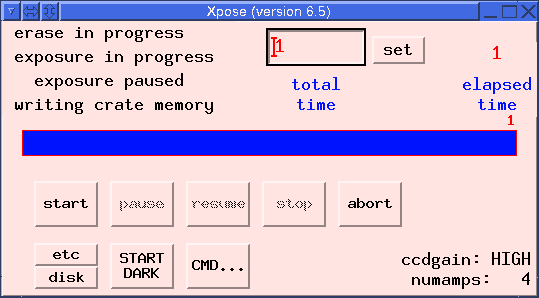
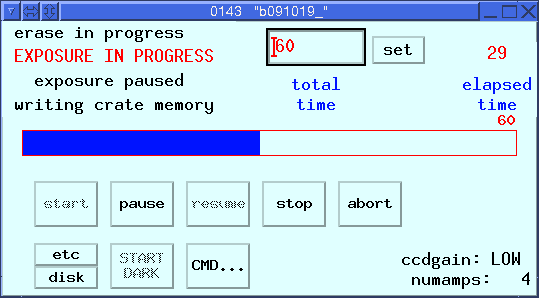
| Action Buttons | |||
|---|---|---|---|
| Button | Function | ||
| START | Star an exposure | ||
| PAUSE | Suspend the current exposure. Close the shutter until further action is taken. | ||
| RESUME | Continue a previously paused exposure. Open the shutter. | ||
| STOP | Immediately stop an exposure and readout the data | ||
| ABORT | Immediately close the shutter and discard the current image. | ||
| etc | Opens a sub-window to change the CCD readout window and binning | ||
| disk | opens a sub-window to access disk write functions | ||
| START DARK | Start an exposure without opening the shutter | ||
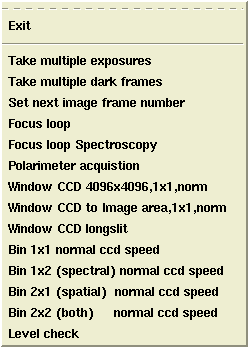
| CMD ... | opens menu from which LRIS scripts are started | ||
| SET | sets the exposure time to the number in the box at left | ||
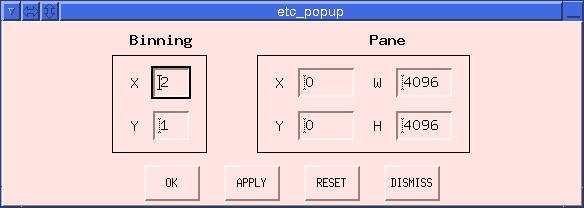
The etc... subwidget allows manipulation of the CCD readout window and binning. The blue side may not be windowed, unless the readout is for a single chip. To bin data on the blue side, "Two amp readout" on the left or right must first be selected. If you try to sub_window the blue side or you try binning without setting "Two amp readout," the blue side crate will be lost after the first readout and will require rebooting.
| Red Side | Blue Side | |
|---|---|---|
|

|
Enter the number of columns and rows in the resulting image into the boxes labeled W (width) and H (height), respectively. For Blue side data only, when operated without binning (binning factor of 1) the maximum value for each is 2048. If the binning factor is N, then the maximum value is reduced to 2048/N.
| Red Side | Blue Side | |
|---|---|---|

|

|
| Red Side | Blue Side | |
|---|---|---|
|

|
| Red Side | Blue Side | |
|---|---|---|

|
|
| Red Side | Blue Side | |
|---|---|---|

|
|
| Red Side | Blue Side | |
|---|---|---|

|

|
| Red Side | Blue Side | |
|---|---|---|
|

|
| Red Side | Blue Side | |
|---|---|---|

|
|
| Red Side | Blue Side | |
|---|---|---|

|
|
 Red side only.