Marc Kassis, Robert Kibrick, Connie Rockosi, Gregory D. Wirth
2009-Jun-21
Contents
Background
In May and June 2009, WMKO and UCO/Lick installed and commissionined a new
red-side dewar for LRIS featuring a new detector mosaic. This
long-awaited upgrade to the instrument offers numerous benefits to
LRIS observers:
- higher quantum efficiency in the red, extending coverage
into the I band;
- elimination of interference fringes and the associated
problems with flatfielding resulting from image motion due to
instrumental flexure;
- larger detector area for greater spectral range;
- smaller pixel size;
- flat focal plane for more uniform focus across the red
field of view.
Along with the new detector, several other changes to LRIS affect
the way observers will use the upgraded instrument. This document
describes the various changes and their implications for
observing.
Physical Description
The new LRIS-R mosaic consists of two 2k×4k LBNL
high-resistivity CCDs. These devices offer significantly higher
quantum efficiency (QE) in the red that significantly extends the
usable wavelength range of the red side of LRIS, extending
coverage into the I band. Plots of the QE curves for each device
in the mosaic are attached later in this
document. In addition, images taken with these CCDs do not suffer
from interference fringes, thus reducing the impact of
instrumental flexure on flat field corrections.
In addition, these CCDs provide a larger detector area, smaller
pixels (15 μm versus 24 μm in the Tektronix/SITE
2k×2k CCD), and a flatter focal plane. Because the area
per pixel is now 40% of what it used to be, observers may want
to bin pixels during CCD readout, and both row and column
binning are supported.
Unlike the Tektronix/SITE 2k×2k monolithic CCD they
replace, the CCDs in the LRIS-R mosaic are not production
science-grade devices from a commercial vendor. Rather, they
are early prototype devices from LBNL, and as such, they have
more traps, cosmetic defects, and other anomalies than in
typical science-grade devices. These foibles are described in
the accompanying section on cosmetics.
Quantum Efficiency
The quantum efficiency curves as measured in the lab at Lick are
presented below. These curves are reproduced from PDR and DDR
documentation.
Gain & Readnoise
The gain and readnoise of the new mosaic depend on the selected
CCD gain and readout speed. Under normal operations, observers
will use "normal" CCD speed with the gain set to "high" while
binning 1x1, 1x2, 2x1, or 2x2. The following table provides CCD parameters for this
operating mode. For gain and readnoise values corresponding to
other CCD speed and gain settings, please see the separate report
on red-side gain and
readnoise.
LRIS-R Detector Characteristics
CCDSPEED=normal and CCDGAIN=high
| VidInp |
Amplifier |
Gain |
Noise |
Dark Current |
| [e-/DN] |
[DN] |
[e-] |
[e-/px/hr] |
| 1 |
1-12L |
1.022±0.005 |
4.57 |
4.67 |
1.7* |
| 2 |
1-12R |
0.955±0.005 |
3.97 |
3.79 |
1.7* |
| 3 |
1-13L |
0.877±0.006 |
3.39 |
2.97 |
1.3* |
| 4 |
1-13R |
0.916±0.005 |
3.38 |
3.10 |
1.3* |
*Dark current measurements should be considered preliminary and
represent an upper bound. Actual dark current may be slightly
lower.
Readout Times
The new red mosaic offers three readout speeds:
- Normal. The default mode, it provides a compromise
between speed and readout noise. At "normal" readout speed, the
new mosaic takes longer to read out than the old red detector
system.
- Fast. Useful for instances when speed is at a
premium and higher readout noise is acceptable; for example,
slitmask alignment images. Readout noise is roughly doubled in
this mode.
- Slow. Provides marginal gains in readout noise on
some of the CCD amplifiers at the cost of increased readout
time. However, not that on some amplifiers the readout noise
will be higher in slow mode than in normal mode. For that
reason, slow mode is not recommended.
The following table gives the minimum
times required to acquire a full-frame LRIS exposure in various
red detector operating modes.
LRIS-R Mosaic Readout Times
| CCDSPEED |
Binning |
Readout Time* |
| Normal |
1x1 |
1:44 |
| Normal |
1x2 |
1:05 |
| Normal |
2x1 |
1:10 |
| Normal |
2x2 |
0:49 |
| Fast |
1x1 |
1:09 |
| Fast |
1x2 |
0:48 |
| Fast |
2x1 |
0:53 |
| Fast |
2x2 |
0:41 |
*Elapsed time for 0 sec exposure, including erase, expose,
and readout phases.
Linearity
In contrast to the old red detector system, the onset of
non-linearitry occurs before the saturation of the ADC
(65,536 DN). Observers should strive to keep the peak signal
level below 50,000 DN to ensure that they are operating in
the linear regime.
Pattern Noise
[TBD]
Hysteresis
[TBD]
Traps and bad columns
[TBD]
Flatfielding variations
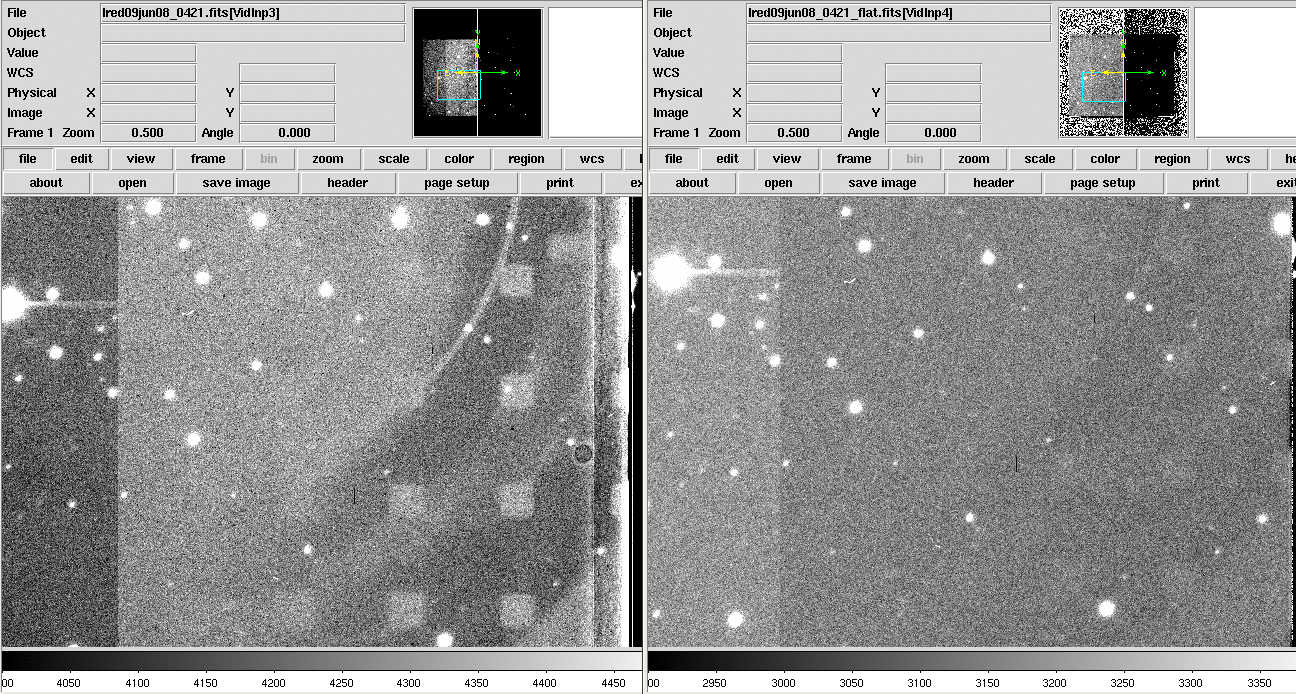
The LRIS-R detectors exhibit some cosmetic features in both CCDs
that present a flatfielding challenge. The tape effect
is a QE variation seen in the 100 columns of both CCDs adjacent to
the gap that results from the effect of packaging the detectors.
Additionally, one of the detectors (red CCD2, which is the one
aligned with CCD1 of the blue mosaic) was damaged by a handling
procedure during manufacture, resulting in large-scale arc- and
box-shaped variations in the detector response. These artifacts
are readily seen on any raw image.
The ampliture of the tape effect is roughly a 2% variation in
the flats, which fortunately flatfields out perfectly at all
wavelengths. In the I-band, the chuck-pattern defects have an
amplitude of about 1% in the raw data and are undetectable in a
flat-fielded frame. In R, the chuck-pattern amplitude is about
3% in the raw data. After flat-fielding, the residual pattern
remains with an amplitude of about 1%. Before and after
pictures for R and I
images appear below.
LRIS-R R-band Image Before and After Flatfielding
|
|
Note artifacts visible in raw image at left; much reduced in
flatfielded image at right.
LRIS-R I-band Image Before and After Flatfielding
|
|
Note artifacts visible in raw image at left; much reduced in
flatfielded image at right.
Lab tests showed that the QE variations from the chuck pattern
were worst at blue wavelengths, so the flatfielding variations
on the red mosaic are expected to be even greater in V. It is
possible that more work and care with the flats will improve the
situation in the R and V paassbands, but observers should be
aware of this issue.
The other CCD (1-12, CCDLOC=1) does not suffer the same
vacuum-chuck damage during fabrication and so does not show the
same features. Although it does exhibit the tape effect,
flatfielding appears to remove these artifacts on CCD 1-12 quite
effectively.
Note that the bright area visible from about column 15 to 35
(columns < 15 are masked) is yet another kind of image
artifact. It is an edge effect that is additive, not
multiplicative, and probably has to do with photons collected in
the dead area of the CCD outside the imaging area leaking into
the first few columns. It is much less pronounced in
spectroscopic frames, possibly because there are fewer photons
as compared to an imaging frame.
Radiation events
The new CCDs are much better detectors of cosmic ray events than
the ones they replaced, which is a nice way of saying that
observers can expect to see a higher rate of cosmic ray events in
their images than before. The rate of cosmic ray and other
radiation events is such that in a 1200 second dark exposure,
between 0.7% and 1% of the pixels are contaminated at a level more
than 5σ above the background bias. The expected muon rate,
taken from work done by the LBL group, Stover and others (e.g., Smith et
al. 2002, Proc. SPIE, 4669, 172) in the process of
characterizing these fully-depleted, thick CCDs, is about 390
events per quadrant of the mosaic. That suggests an average size
for the trails of 100 pixels. The actual distribution of event
sizes in pixels is extremely broad, but 100 is reasonably close to
the mean. The majority of the tracks are straight, indicating that
the shielding is doing its job of keeping out local low-energy
electrons. An example of part of a frame is seen below.
Cosmic Rays in an LRIS-R Dark Image
|
|
The minimum FWHM at best focus for imaging and longslit mode is
comparable to that seen on the blue side. The 100 µm
gradient seen in the focus in the spatial direction in the old red
side is considerably less steep. A direct comparison will require
more work to distinguish changes to the focus software from
changes to the data. We will also analyze longslit focus data to
check the image quality in the new detector real estate. The
bottom line from the analysis so far is that image quality is, at
worst, unchanged.
Comparison to Original Red CCD
Steve Allen of UCO/Lick has kindly produced the following diagram
comparing the area of the new mosaic (shaded region) to the
previous red-side CCD (white outline).
LRIS-R Science Mosaic Geometry
|
|
Astrometry
The red and blue LRIS imaging data for this analysis are of the
sparse globular cluster Palomar 5 using unpublished astrometry
generously shared by Kyle Cudworth. Each of the two quadrants on
either side of the gap have about 100 matches to Cudworth's
catalog, and the median offset between the astrometric solution
computed from a subset of that sample and the entire 100 stars is
0.18 arcsec, with only a few outliers.
Based on these images, the plate scale of the new red mosaic is
0.135 arcsec/pix in both the column and row directions.
Using the plate scale for the old CCD of 0.211 arcsec/pix,
the scale for the new mosaic should have been changed by the
ratio of the pixel sizes, 15/24, to 0.132 arcsec/pixel.
The difference is 2.5%.
A plot of the layout of the focal plane on the sky for this
image of Pal 5 is seen below. Note that this
frame was taken at PA=-90° to get maximum overlap with the
Pal 5 astrometric catalog. For a PA of 0°, rotate RA,Dec
relative to the pixel coordinates. The red CCD on the north
side of the gap in this frame is 1-13 in Lick's nomenclature,
and is labeled as such and as CCDLOC=2 in the headers. The red
quadrant that borders the gap to the North is HDU 4 in the FITS
files, and is labeled as extension (HDU) vidinp4 in the header.
The northmost quadrant is HDU3, vidinp3. On the south side of
the gap, the red CCD is labeled CCDLOC=1, CCD 1-12 in Lick's
nomenclature. The quadrant on the gap is HDU 1 in the FITS
files, vidinp1. The other quadrant, furthest south, is vidinp2.
LRIS Red and Blue FOV Projected Onto Sky
|
|
On the blue side, CCD1 (as labeled with CCDLOC) is on the north
side of the gap. FITS extension HDU 3 (vidinp3) borders the gap,
and vidinp4 (HDU 4) is northmost. The blue CCD on the south side
of the gap is CCD0, with HDU 2 (vidinp2) next to the gap and
vidinp1 (HDU 1) southmost.
On either side of the gap for both the red and blue mosaics,
pixel pixel 0,0 (row, column; x,y) of each quadrant is at late
RA. Pixel 0,4095 is at early RA.
Again, mapping between pixel and RA,Dec will change for
different PAs. This is just to help get oriented between red and
blue.
Red/Blue alignment at the gap
The two CCDs on the north (in this image) side of the gap are the
lowest-noise red and blue CCDs. Those are hdu4, CCD2 on the red
and CCD1, hdu3 on the blue. Column 0 of those two CCDs are offset
from one another by 1.8 arcsec at pixel 0,0 (the high RA side in
this picture) and 2.7 arcsec at pixel 0,4096 (the low-RA corner).
The offset parallel to the gap (which in this frame is almost
exactly an offset in RA) is 15.4 arcsec or 111 pixels.
Gap
The red CCDs are slightly tilted with respect to one another. The
gap, specifically the distance between the first column of the two
red CCDs, at pixel (0,4096) is 24.96 arcsec and at pixel (0,0) is
27.91 arcsec.
We have made changes to the observing software to accommodate the
changes to the GUIs and image display. At the end of the lris startup procedure
launched by selecting the appropriate background menu item, the
observing software is auto-arranged. During the auto-arranging,
DS9 displays are resized so that images are displayed as large
as possible. Below are three screen shots of the displays that
show the layout of the observing software after auto-arrangement.
Changes to the left most display are:
- open an xterm to manuka (lrisserver) instead of punaluu.
- relocated the CCD and Motor logs.
Changes to the middle display are:
- All Blue side expose control and image display moved to this
display.
- Xpose GUI layout modified
- DS9 image display replaces FIGDISP display and control GUI
- ds9Relay GUI added
-
Changes to the right most display are:
- All Red side expose control and image display moved to this
display.
- Xpose GUI layout modified
- DS9 image display replaces FIGDISP display and control GUI
- ds9Relay GUI added
-
FIGDISP -> ds9
Image background on ds9 has the same color as the xpose gui
The Red and Blue image displays rotate and flip images such that
both the red and blue orientations are the same. Although
the compass roses have the same orientation, both the red and
blue displays have a compass rose.
There is a known problem with the compass roses. Although the
compass roses correctly indicate North on the images, the EW
coordinates are flipped (wrong handedness). We plan to fix
this problem but currently it is lower priority.
Blackbelt observers have or will notice that the Red and Blue side
displays are on opposite screens relative to the displays before
teh upgrade. This may seem backwards at first, but the new
format has an advantage. On both image displays, the spectral
direction is horizontal (L->R) on the display. Also both display have
the bluest wavelengths on the left hand side of the display and
the redest wavelengths on the right. Thus, observers should see
their object spectra increase in wavelength from left to right
across both displays.
The advent of the new red mosaic required numerous changes to the
LRIS software. Some notable changes affect slitmask alignment and
motion scripts.
The venerable xbox task is history, replaced by
lbox. Rather than call this task directly, we
recommend that observers make use of the following convenient
tasks:
- check_boxes (replaces check_boxesb)
- Use this script when trying to identify your alignment
stars on a direct image of your slitmask field. It will display
the selected LRIS image on the ds9 display and mark the
corresponding locations of the alignment boxes as shown in your
coordinate files. Optionally invokes lbox when done.
Supports both red and blue sides.
- do_check_boxes(replaces do_check_boxesb)
- Use this script when acquiring slitmask alignment images
with the mask in place. This script will wait for the image
currently in progress to read out, check the slitmask name in
the image header, locate the corresponding box file, and launch
check_boxes so that you can verify and adjust the box
locations as required so lbox can find them. Since
it determines the image name and coordinate file automatically,
it helps prevent those late-night mistakes that can cost you
valuable time. Note: this task can't be used on direct images,
since it won't be able to determine the mask name. Supports both
red and blue sides.
- do_lbox (replaces do_xboxb)
- You can use this task instead of do_check_boxes
if you are confident that your box locations are secure and thus
don't require the visual confirmation offered by
check_boxes/do_check_boxes. Skipping the display of
the image saves some time, so this method is faster. This
script will wait for the current image in progress to read out,
then it will run lbox on it (if no image is in
progress, it reads the latest image from disk). Can be used
with either the red or blue side.
Use movr and movb for executing telescope
moves on the red and blue sides, respectively. The IRAF tasks
mshift and mshiftb no longer exist. The
gmov script can be used for motion on the old
movable offset guider only; will not work with the new
slit-viewing guider due to the different rotation and scale.
The noise measurements tabulated above correspond to the results that
can be achieved when the serial clock delay parameter (keyword
LSERCLKD) has been optimized for the particular
combination of:
- LRIS-R CCD Controller operating temperature (as reported by
UTBTEMP keyword)
- CCD readout speed (as reported by CCDSPEED
keyword)
- CCD binning (as reported by BINNING keyword)
The support staff will optimize this
parameter before observing. When optimized, the gain and
noise at a particular readout speed and preamplifier gain setting
will be the same regardless of the operating temperature or
binning.
Unlike the blue CCD mosaic, the red CCD mosaic may be set to read
out any desired rectangular region. Windowing is now accomplished
using the PANE keyword. Observers can modify the PANE keyword
directly either by updating the keyword via the command line or
using the window selection on the Xpose
GUI. Windowing the CCD in the spatial direction will not save
readout time. Windowing the CCD in the spectral direction will
save time, but will reduce wavelength coverage and thus is not
typically something the observer wants to do.
On the CMD... menu available on the red Xpose GUI, there are options for windowing
the CCD:
- Window full frame is used to readout the entire
detector.
- Window longslit is used to read out only the long
slit region. As noted above, this is not any faster than
fullframe readouts but will save disk space.
Observers should bin the detector in the spatial and/or spectral
direction for two reasons:
- First, to be sky noise dominated in the same amount of time
at 7000 Å as the old red detector, it is necessary to
bin by two in either axis.
- Second, binning decreases the readout time (see readout times).
Four commonly used binning modes are available on the
CMD... menu available from the Xpose GUI. These modes are 1x1, 1x2, 2x1,
and 2x2. Selecting these modes does not change how the CCD is
windowed. Note that these scripts will set the CCD readout speed
to normal.
If binning is not set to one of these standard modes, then the
amplifier offsets and pixel delay clock will need to be re-tuned
to minimize pattern noise for the desired configuration. This is
a time consuming process and should be avoided until we have an
opportunity to calibrate additional readout modes.
Observers should never modify binning using the
WIN... option on the Xpose
GUI, because doing so will not adjust the pixel delay clock
and hence pattern noise will occur in the images. Instead,
binning should only be changed using the options available on the
CMD... menu.
Use normal speed for science images. If desired, save
readout time on slitmask alignments by using the (yet to be
written) goifastr script to acquire quick images; this
script will acquire a single image in fast mode and then return
you to normal speed.
[TBD: explain when to choose low vs. high gain]
Until now, the FITS files written for both the red and blue sides
were written as simple FITS format with all data assembled into a
single 2-D array. To comply with accepted standards for storage
of CCD mosaic image data, LRIS red and blue images are now storage
as multi-HDU (header data unit) FITS files. As with HIRES and
DEIMOS, data from each CCD amplifier are stored in a separate
image extension. Each extension includes both data and a
header describing the content of that extension. Furthermore, a
primary HDU contains information common to all extensions (e.g.,
LRIS mechanism keywords).
The simplest way to display LRIS multi-HDU images is to read them
into a FITS viewer which understands how to assemble mosaic data
into an image. The ds9 image display
tool is one such program. To view an LRIS image in ds9, simply
open the image using the File > Open Other > Open
Mosaic IRAF.. function. Note that you must set the ds9 flip
and rotation parameters as follows in order to achieve the
customary view which puts the spectral direction increasing to the
right: [TBD]
[TBD: note old vd. new ds9 difference]
IRAF users may use the lrisdisplay task in the keck.lris to view images on the IRAF
display tool.
IDL users can use the readmhdufits routine to read the
image into a 2-D array, then display it using the atv image
display tool.
WMKO has made available two software tools which will generate a
monolithic single-HDU image (i.e., one that combines the pixels
from all amplifier regions into a single-HDU FITS file) from a
multi-HDU LRIS mosaic image:
- readmhdufits is an IDL
routine which reads in the multi-HDU LRIS images and assembles
them into a single 2-D array, with optional bias subtraction
based on the overscan region.
- multi2simple is a task distributed as part of
the keck.lris package to read in
multi=HDU images and output a simple FITS image.
- splitmos is a utility that will convert a
multi-HDU FITS file into a set of a single-HDU format files,
with one file per readout amplifier region. This program is
installed on the LRIS host computer.
- afternoon calibrations
- science acquisition
- guiders (OMG, NOG, Slit)
- status
- geometry
- Focusing.
- image naming scheme ([r/b]YYMMDD_NNNN.fits)